Never Hit Claude Usage Limits Ever Again
How to Use Planning, Memory, Model Selection, and Tool Splitting to Avoid Burning Through Your Limits

There is a strange moment that happens when you start using Claude seriously.
You usually hit the wall much faster than expected. You blame the plan, the model, Anthropic, the time of day, or Claude Code itself.
But after a while, a pattern becomes obvious:
The limit is not only about how many prompts you send.
It is about how much unnecessary work you make Claude do.
A vague prompt creates follow-up questions.
A long chat carries old context.
A missing memory system makes you repeat yourself.
The wrong model burns usage on simple tasks.
The wrong tool turns a small job into an expensive workflow.
Anthropic’s own usage guidance says the same thing in a more formal way: plan conversations, be specific, use memory and projects, batch related requests, and review prompts before sending them. Usage limits are affected by how you structure the conversation, not just how often you click send.
That was the shift for me.
I stopped thinking about Claude as a chat app and started treating it like a work system.
The question became less:
“How do I get more Claude usage?”
And more:
“Why am I wasting so much of the usage I already have?”
This article is my answer to that question.
I’ll walk through the workflow I use now to get more out of Claude without constantly running into limits: planning before building, keeping chats short, using proper memory, stacking models correctly, and splitting work across the right Claude tools.
None of this is about gaming the system.
It is about using Claude with the same discipline you would use for any expensive engineering resource: give it a clean context, clear tasks, the right tool, and the right level of compute.

Table of Contents:
Plan Before You Build
Stop Using One Chat for Everything
Build a Proper Memory System
Use Model Stacking Instead of Opus for Everything
Split Work Across the Right Claude Tools
Want to go deeper into multi-agent deep search systems?
I’m hosting a live architecture workshop: Designing Multi-Agent Deep Search Systems.
In this 1.5–2 hour session, we’ll break down how to design agents that plan, search, validate sources, handle contradictions, merge evidence, manage context, and improve across iterations.
1. Plan Before You Build
Most people do not hit Claude usage limits because they asked one difficult question.
They hit the limit because they use Claude in the most expensive way possible:
They brainstorm inside the same session.
They ask vague questions.
They let Claude explore too much.
They ask to build before they know what they actually want.
Then they ask it to rebuild the same thing two or three times.
That is where the real waste happens.
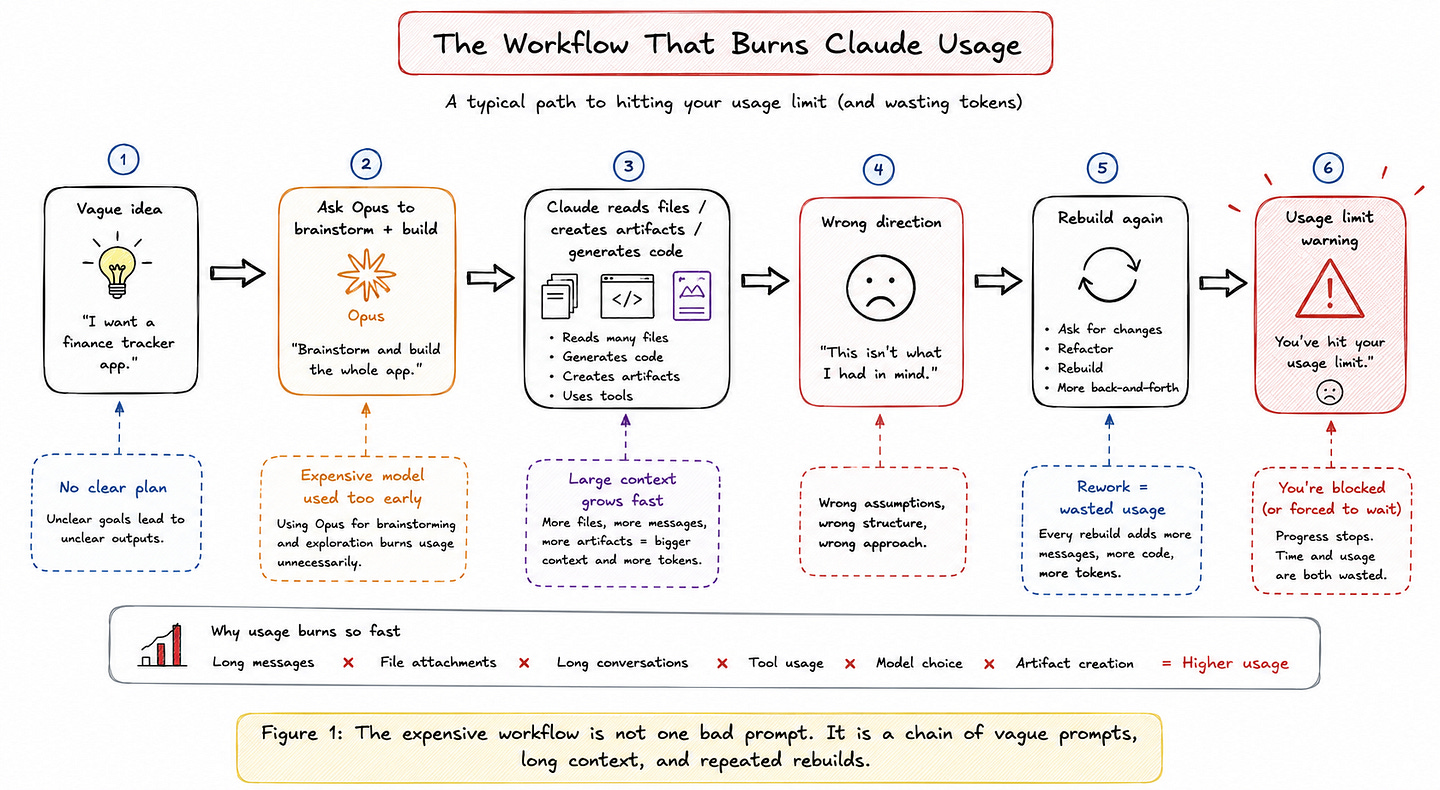
Claude usage is not only about the number of messages you send. Anthropic’s own usage guidance says limits are affected by several things: message length, attachments, conversation length, tool usage, model choice, and artifact creation. In Claude Code, the problem becomes even more obvious because every turn carries the previous conversation, project context, files Claude has read, and your new prompt. Long sessions get expensive because the context keeps growing.
This is why planning matters.
Before you ask Claude to write code, design a UI, generate files, refactor a project, or build an app, spend a few minutes deciding what the output should look like.
Not inside Opus by default.
Use a cheaper model for the messy thinking phase. Use Haiku or Sonnet to brainstorm, compare options, write the rough spec, or turn your idea into a clear implementation plan. Then switch to Opus only when you really need deeper reasoning: architecture decisions, hard debugging, large refactors, or tasks where a wrong first attempt will cost you more later. Anthropic’s Claude Code guidance says Sonnet is the right default for most coding work, Opus should be reserved for harder problems, and Haiku is best for quick or simple tasks.
This one habit can save a surprising amount of usage.
Imagine two people building the same finance-tracking app using Claude Code.
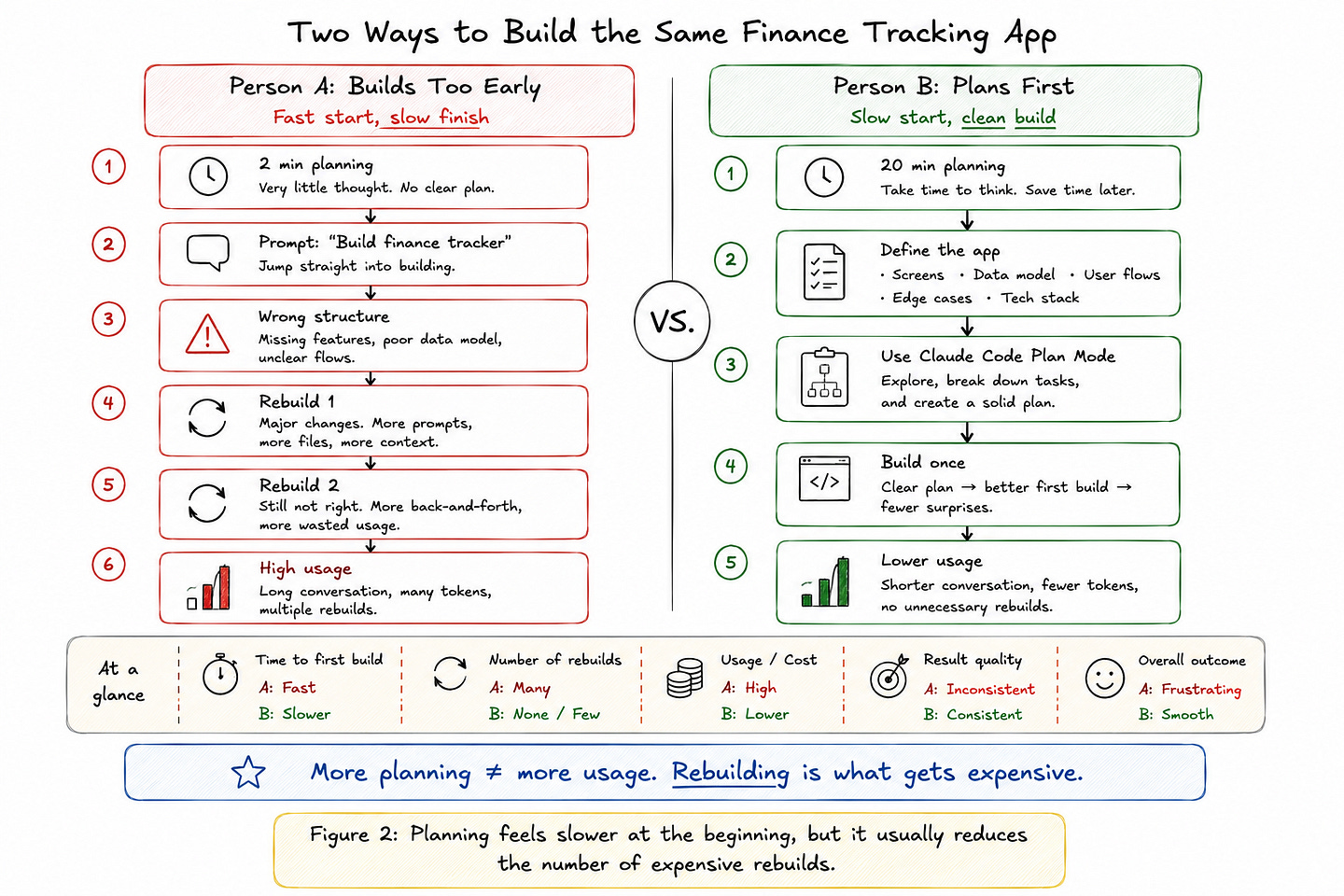
Person A spends two minutes planning. They ask Claude to “build a finance tracker,” then discover the app structure is wrong, the database design is messy, and the UI does not match what they wanted. So they ask Claude to rebuild it.
Then rebuild it again.
Person B spends 20 minutes planning first. They define the main screens, database tables, user flows, edge cases, and tech stack. When they finally ask Claude to build, the first version is much closer to what they had in mind.
Person B may feel slower at the start, but they are usually faster overall.
More importantly, they burn fewer tokens.
A short plan is cheap. A wrong 400-line diff, a long explanation of what went wrong, and another full rebuild are not. Anthropic’s Claude Code docs make the same point: for larger changes, ask for a plan first because it helps prevent expensive rework when the initial direction is wrong.
Claude Code already gives you a dedicated way to do this: Plan Mode.
Plan Mode lets Claude inspect the codebase, think through the change, and propose an implementation plan before it edits your files. You can enter it with:
/planOr by pressing:
Shift + TabYou can also start Claude Code directly in plan mode:
claude --permission-mode planIn this mode, Claude can research and propose changes, but it will not edit your source files until you approve the plan.
My default workflow is simple:
Use cheaper models for rough thinking.
Use Plan Mode before big changes.
Use Opus only when the quality of the reasoning actually matters.
Then let Sonnet handle most of the implementation.
That is the real trick.
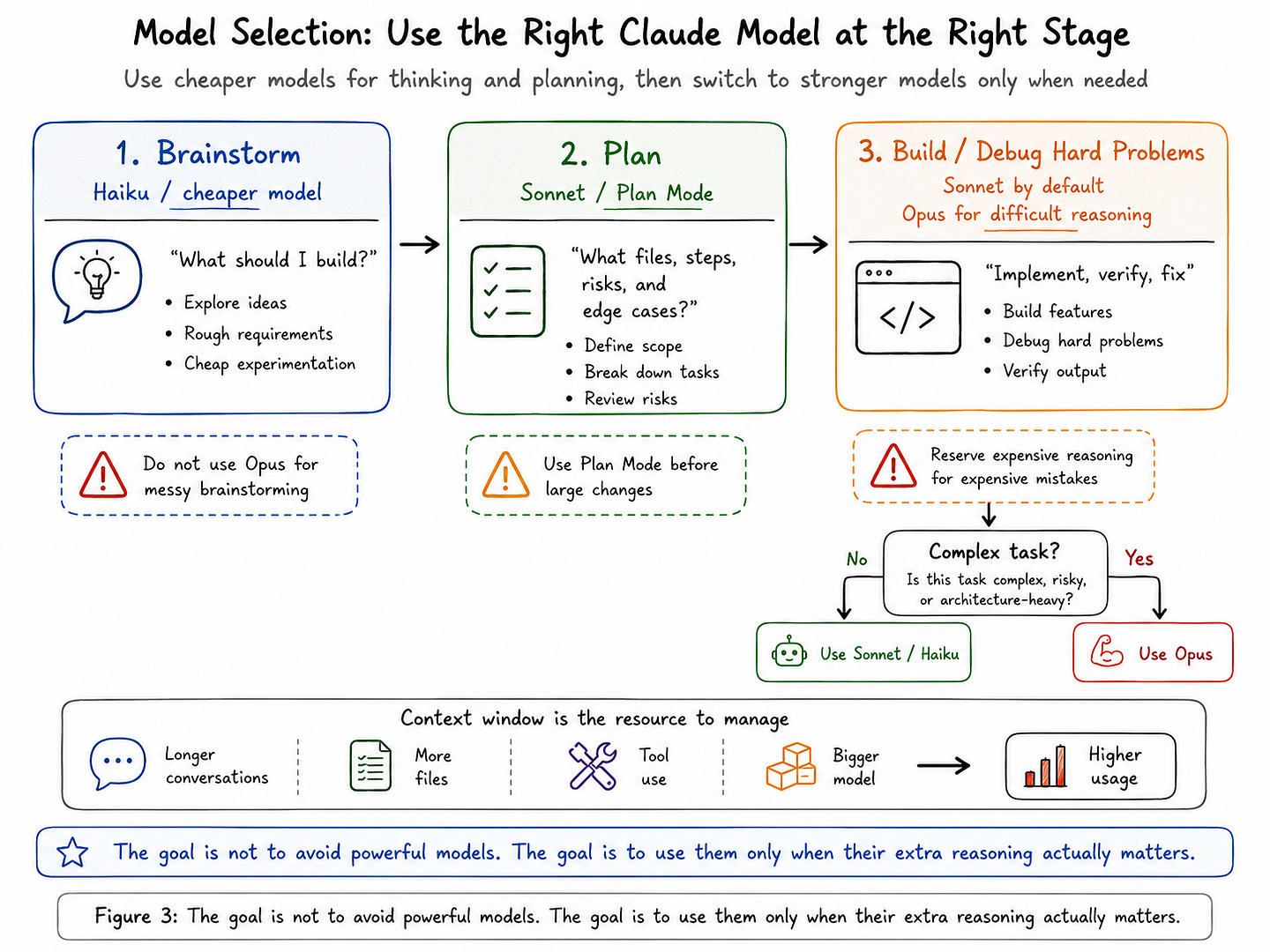
You do not need to stop using Claude heavily. You need to stop using the most expensive model for the least valuable part of the workflow.
TL;DR: Do not start with “build this.” Start with “help me plan this.” Then build once instead of rebuilding three times.
2. Stop Using One Chat for Everything
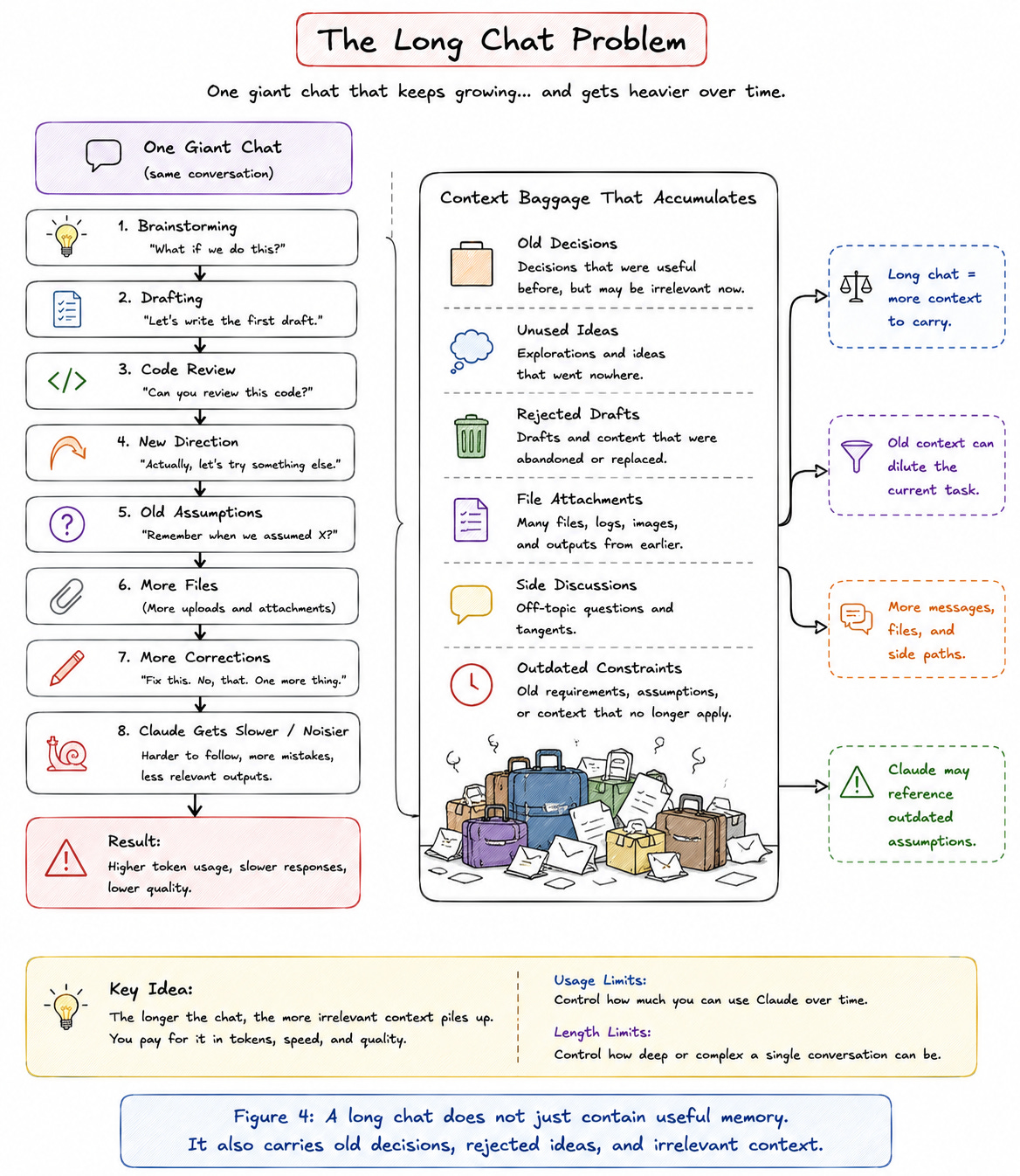
Long chats are one of the easiest ways to waste your Claude usage without noticing.
At the beginning, a long chat feels useful. Claude remembers what you said earlier, understands the task, and can continue from where you left off.
But after a while, the same chat starts working against you.
Every extra instruction, correction, file, artifact, and side discussion becomes part of the context Claude has to deal with. Anthropic separates usage limits from length limits: usage limits control how much you can use Claude over time, while length limits control how deep or complex a single conversation becomes. In practice, very long chats can become slower, harder to steer, and more expensive to continue.
This is especially painful when the chat contains old decisions that no longer matter.
Maybe you changed the app structure.
Maybe you switched the article angle.
Maybe you asked Claude to explore three different approaches before choosing one.
Maybe half the conversation is now irrelevant.